> ## Documentation Index
> Fetch the complete documentation index at: https://docs.polywin.bot/llms.txt
> Use this file to discover all available pages before exploring further.
# Browse Markets
> Every Polymarket market, one tap or one paste away.
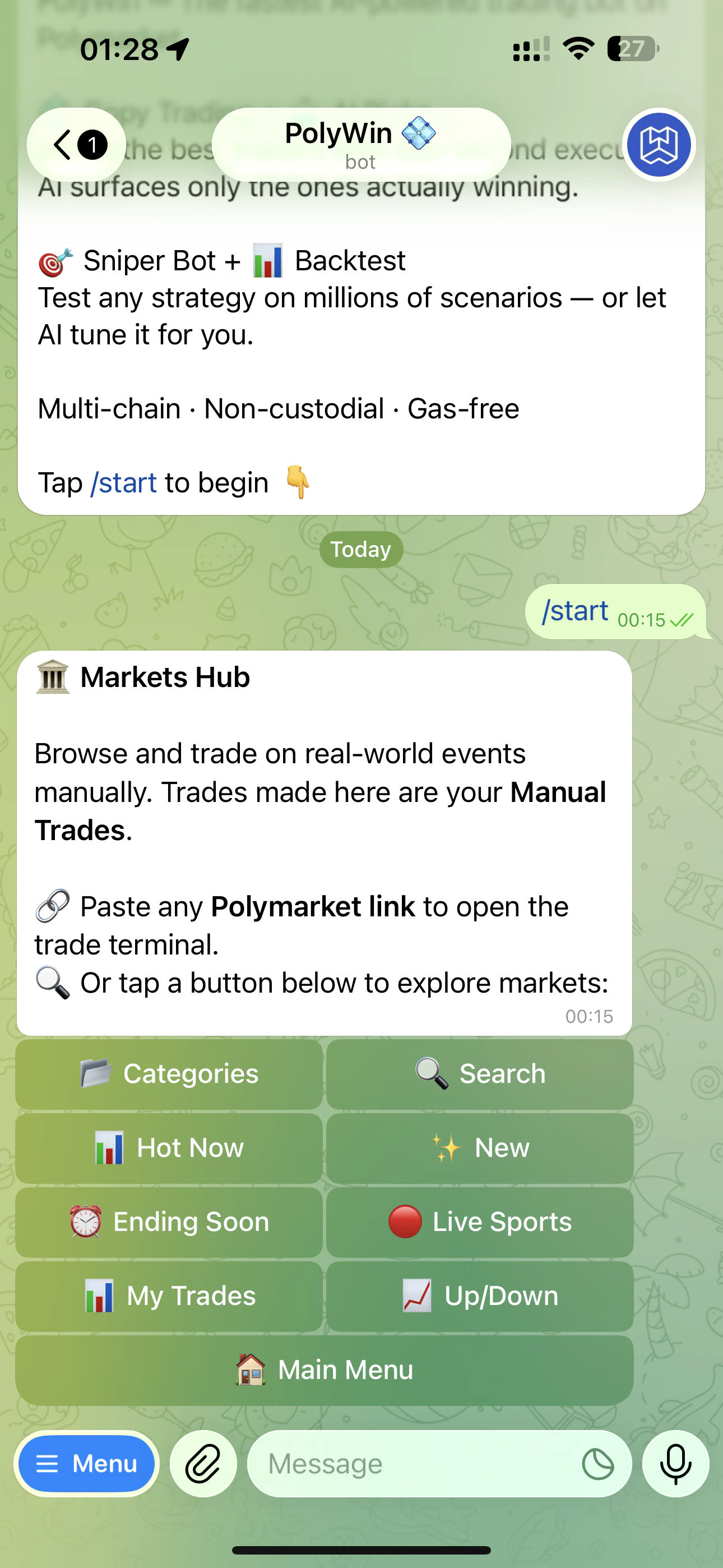
The Markets Hub is your manual trading entry point — distinct from Copy Trade and Snipe. Anything you trade from here is tagged as a **Manual Trade** in your positions and history.
 ## Two ways in
Tap one of the discovery tiles to surface a curated list:
* **📂 Categories** — full category browse (Politics, Sports, Crypto, Pop Culture, and more)
* **🔍 Search** — keyword search across every active market
* **🔥 Hot Now** — markets with the most activity in the last hour
* **✨ New** — recently listed markets
* **⏰ Ending Soon** — markets resolving in the next few hours
* **🔴 Live Sports** — sports events currently in progress
* **📂 My Trades** — markets where you already hold a position
* **📊 Up/Down** — crypto up-or-down candle markets (BTC, ETH, SOL, etc.)
Paste any `polymarket.com/...` URL into the chat. PolyWin opens the trade terminal for that exact market — fastest way to act on a market you already have in mind.
## Events with multiple markets
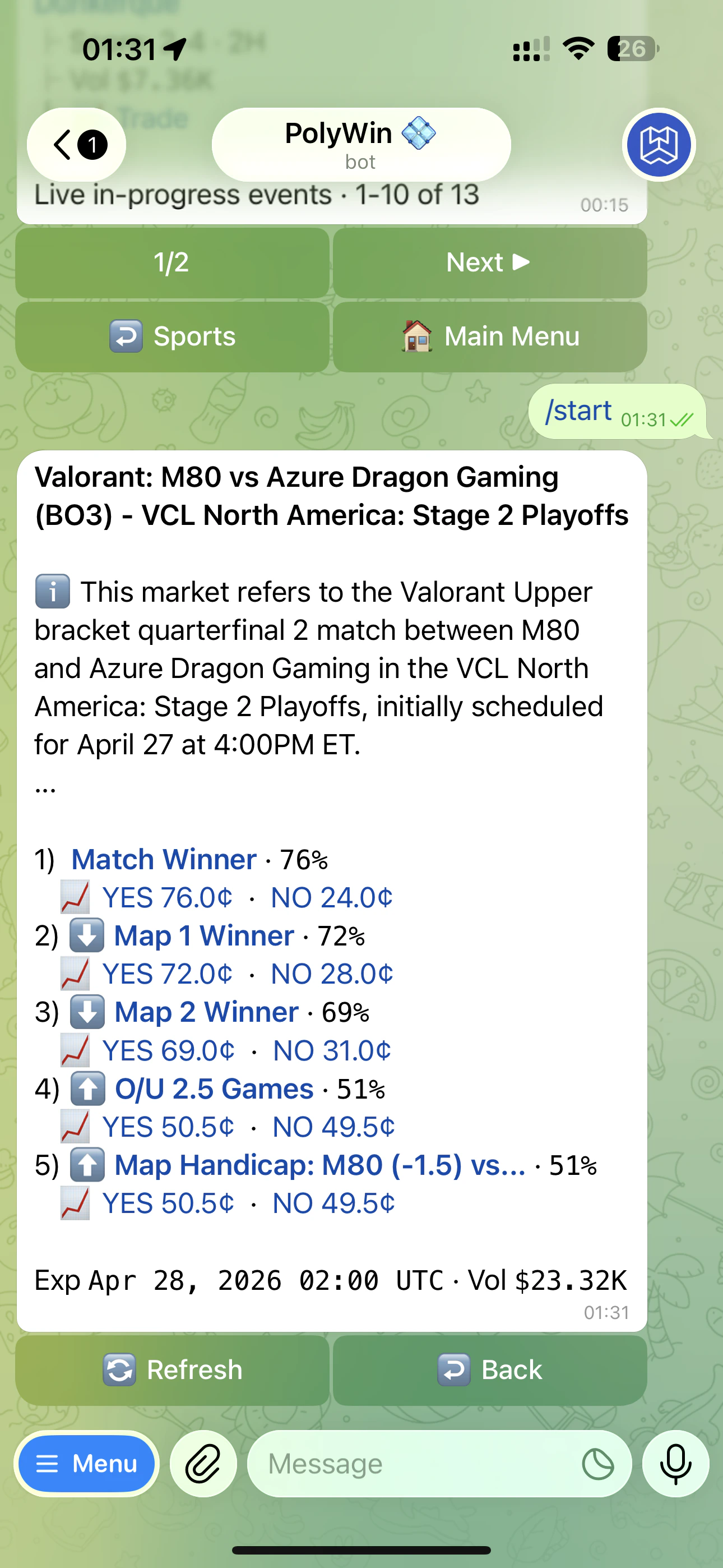
Some events bundle several related markets — a sports match might list `Match Winner`, `Map 1 Winner`, `Map 2 Winner`, `Over/Under 2.5 Games`, and a `Map Handicap` line all under the same event header. PolyWin shows them stacked with current YES/NO prices for each, so you can pick the angle you want before drilling into the trade terminal.
## Two ways in
Tap one of the discovery tiles to surface a curated list:
* **📂 Categories** — full category browse (Politics, Sports, Crypto, Pop Culture, and more)
* **🔍 Search** — keyword search across every active market
* **🔥 Hot Now** — markets with the most activity in the last hour
* **✨ New** — recently listed markets
* **⏰ Ending Soon** — markets resolving in the next few hours
* **🔴 Live Sports** — sports events currently in progress
* **📂 My Trades** — markets where you already hold a position
* **📊 Up/Down** — crypto up-or-down candle markets (BTC, ETH, SOL, etc.)
Paste any `polymarket.com/...` URL into the chat. PolyWin opens the trade terminal for that exact market — fastest way to act on a market you already have in mind.
## Events with multiple markets
Some events bundle several related markets — a sports match might list `Match Winner`, `Map 1 Winner`, `Map 2 Winner`, `Over/Under 2.5 Games`, and a `Map Handicap` line all under the same event header. PolyWin shows them stacked with current YES/NO prices for each, so you can pick the angle you want before drilling into the trade terminal.
 ## What each market card shows
* Bold market title
* 24-hour volume
* Smart expiry — full date if it's days away, live countdown if it expires in under 3 hours
## Sort and filter
Sort by volume, newest, or expiry. Filter to hide low-volume markets. Pin favorites to your watchlist.
See the order book, current prices, and trade in one screen.
## What each market card shows
* Bold market title
* 24-hour volume
* Smart expiry — full date if it's days away, live countdown if it expires in under 3 hours
## Sort and filter
Sort by volume, newest, or expiry. Filter to hide low-volume markets. Pin favorites to your watchlist.
See the order book, current prices, and trade in one screen.