> ## Documentation Index
> Fetch the complete documentation index at: https://docs.polywin.bot/llms.txt
> Use this file to discover all available pages before exploring further.
# Buy & Sell
> Market orders, three taps.
PolyWin keeps the buy flow short — three steps from market detail to filled position.
## Buy
Tap **🟢 Buy YES X¢** or **🔴 Buy NO X¢** from the market detail screen.
Use a preset (**$25 · $50 · $100**) or enter a custom amount between **$5** and **\$10,000**. The bot previews how many shares you'll get before you commit.
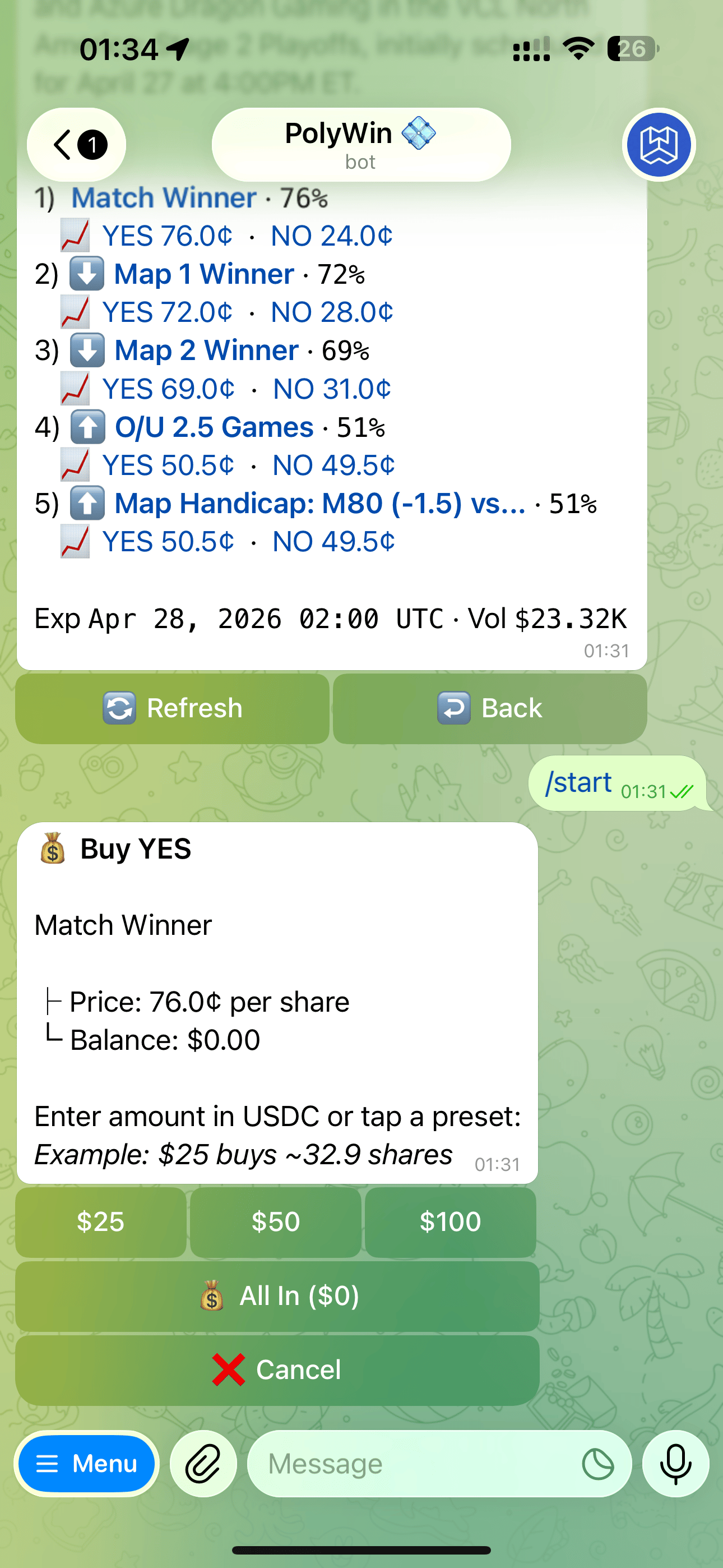 Your order fills as a market order. You'll see the total position size on success.
## Sell
Sells happen from the [Positions Hub](/positions/hub), not the market detail.
Tap **📊 Positions** from the main menu.
Tap any open position to see its detail.
Sell 100%, or use partial sell presets (25% / 50% / 75%).
Default slippage is set silently. If the book can't fill you within tolerance, the order is rejected and your funds stay safe.
Your order fills as a market order. You'll see the total position size on success.
## Sell
Sells happen from the [Positions Hub](/positions/hub), not the market detail.
Tap **📊 Positions** from the main menu.
Tap any open position to see its detail.
Sell 100%, or use partial sell presets (25% / 50% / 75%).
Default slippage is set silently. If the book can't fill you within tolerance, the order is rejected and your funds stay safe.