> ## Documentation Index
> Fetch the complete documentation index at: https://docs.polywin.bot/llms.txt
> Use this file to discover all available pages before exploring further.
# Positions Hub
> Live PnL across every wallet, every strategy.
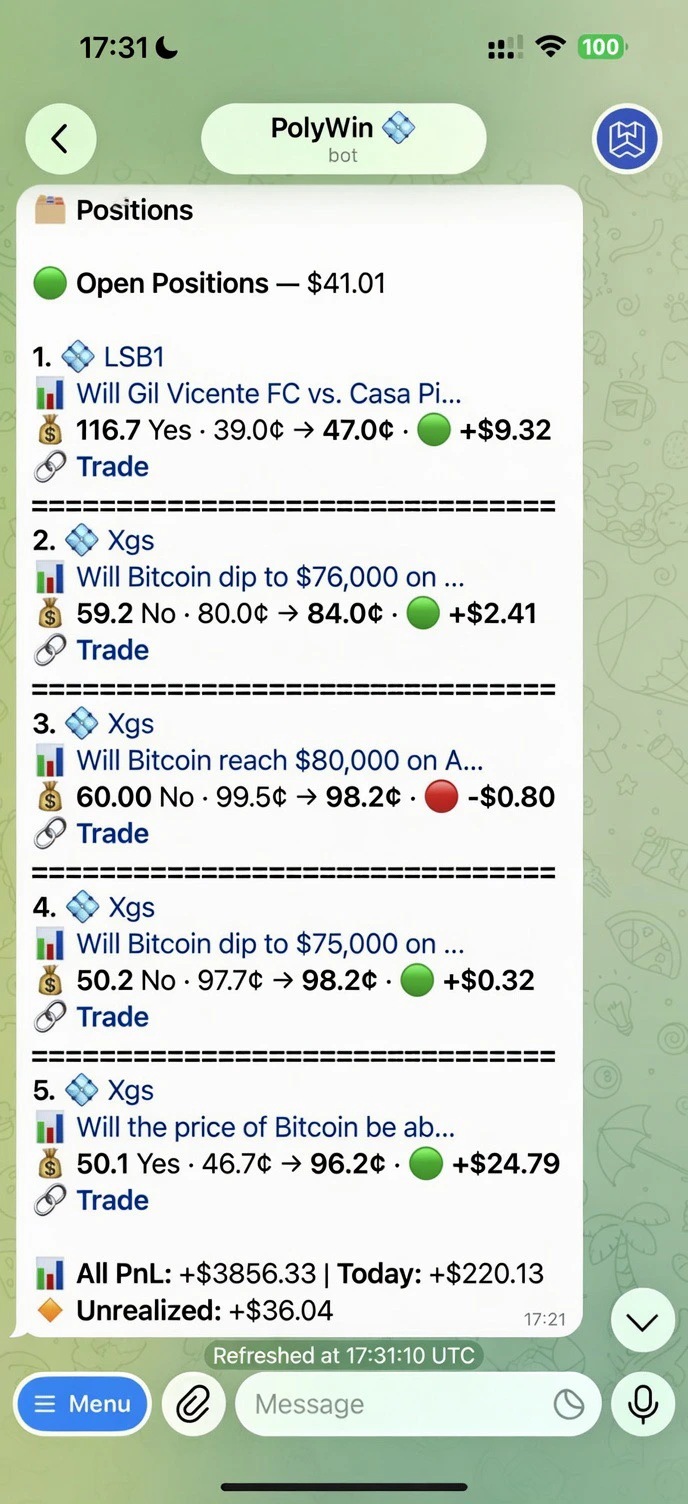
The Positions Hub is your single view of everything you hold on Polymarket — copied trades, snipes, manual buys, all together.
 ## What you see
Each open position is one compact line with:
* **Rank + source** — `1. 💠` (Copy) / `⚡` (Snipe) / `📊` (Manual) and the leader/strategy name
* **Market title** — truncated to fit one line
* **Position line** — `shares · YES/NO · entry¢ → current¢ · 🟢/🔴 ±$PnL`
* **🔗 Trade** link — opens the trade terminal scoped to that market, where you can sell, add, or set a limit
At the bottom of the list:
* **All PnL** — total realized PnL across every closed position
* **Today** — realized PnL since midnight UTC
* **Unrealized** — sum of live PnL across the cards above
## Tabs
Live positions across all your wallets and strategies.
Positions where the market is decisive (price ≈ 99¢ or 1¢) but the on-chain payout hasn't finalized yet. Winners show `payout $X coming`; losers show `finalizing on-chain`. Auto-clears in seconds once the chain catches up.
Closed trades — won, lost, or sold — with realized PnL and the source that originated them.
## Filters
A source-filter row sits below the tabs: **All · 💠 Copy · ⚡ Snipe · 👋 Manual**. Tap any chip to scope the visible list to that origin only — useful when you've got positions from multiple Copy strategies and snipers running at once.
You can also drill deeper:
* **Wallet** — single wallet only
* **Strategy / Leader / Sniper** — open the strategy or leader card and tap *Positions* there
## Sell All Positions
A **🔴 Sell All Positions (N)** button lives at the bottom of the Open tab — one-tap mass exit when you need to flatten the book. The count reflects only positions matching the current filter, so you can mass-sell just the Copy or Snipe slice if you want.
## Actions per position
Sell any position with one tap.
Take some off the table — 25%, 50%, 75%, or custom.
PnL refreshes live. Open the hub anytime to see the latest.
## What you see
Each open position is one compact line with:
* **Rank + source** — `1. 💠` (Copy) / `⚡` (Snipe) / `📊` (Manual) and the leader/strategy name
* **Market title** — truncated to fit one line
* **Position line** — `shares · YES/NO · entry¢ → current¢ · 🟢/🔴 ±$PnL`
* **🔗 Trade** link — opens the trade terminal scoped to that market, where you can sell, add, or set a limit
At the bottom of the list:
* **All PnL** — total realized PnL across every closed position
* **Today** — realized PnL since midnight UTC
* **Unrealized** — sum of live PnL across the cards above
## Tabs
Live positions across all your wallets and strategies.
Positions where the market is decisive (price ≈ 99¢ or 1¢) but the on-chain payout hasn't finalized yet. Winners show `payout $X coming`; losers show `finalizing on-chain`. Auto-clears in seconds once the chain catches up.
Closed trades — won, lost, or sold — with realized PnL and the source that originated them.
## Filters
A source-filter row sits below the tabs: **All · 💠 Copy · ⚡ Snipe · 👋 Manual**. Tap any chip to scope the visible list to that origin only — useful when you've got positions from multiple Copy strategies and snipers running at once.
You can also drill deeper:
* **Wallet** — single wallet only
* **Strategy / Leader / Sniper** — open the strategy or leader card and tap *Positions* there
## Sell All Positions
A **🔴 Sell All Positions (N)** button lives at the bottom of the Open tab — one-tap mass exit when you need to flatten the book. The count reflects only positions matching the current filter, so you can mass-sell just the Copy or Snipe slice if you want.
## Actions per position
Sell any position with one tap.
Take some off the table — 25%, 50%, 75%, or custom.
PnL refreshes live. Open the hub anytime to see the latest.