> ## Documentation Index
> Fetch the complete documentation index at: https://docs.polywin.bot/llms.txt
> Use this file to discover all available pages before exploring further.
# Strategy Form Walkthrough
> Every field in the snipe strategy form, explained.
The form is the same shape for both Final and Reversal Snipe, with one difference: Reversal Snipe uses a ladder budget and price range instead of a single trade size.
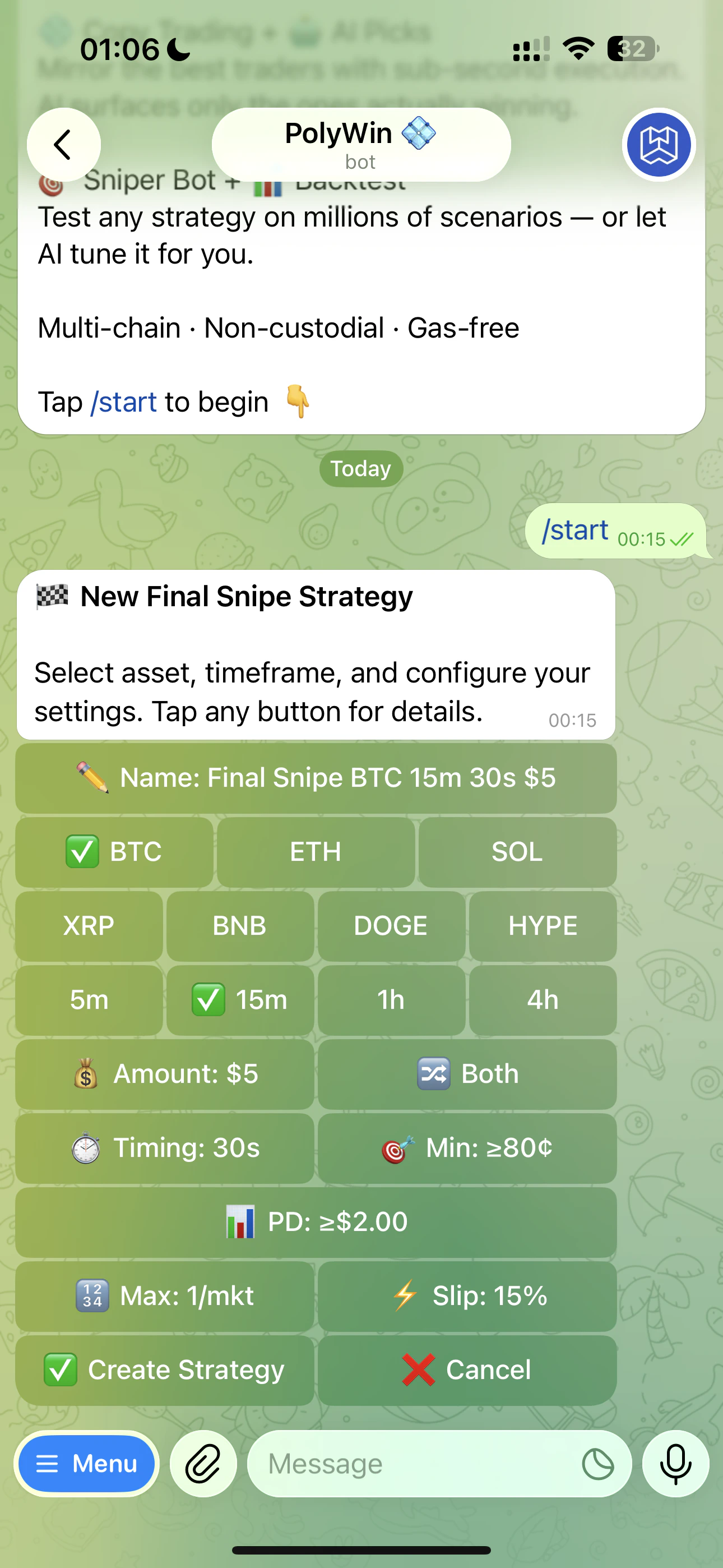 Row 1: BTC · ETH · SOL. Row 2: XRP · BNB · DOGE · HYPE.
5m, 15m, 1h, or 4h. (HYPE skips 1h — not supported.)
🔀 Both · 📈 Up only · 📉 Down only.
* **⏱ Timing** — only trigger inside a specific window of the candle (default 30s before resolution)
* **🎯 Min price to buy** — only fire if shares cost at least this much (price floor, e.g. `≥80¢` skips long-shots)
* **📊 Price movement (PD)** — minimum $ move from strike for Final Snipe (`≥$2.00`); for Reversal it's the **maximum** acceptable move (`≤\$X\`)
Final Snipe: fixed USD amount per trigger. Reversal Snipe: ladder price range (min/max), number of levels (1–50), and total USD budget.
🛒 Max trades per market, ⚡ slippage tolerance.
Tap **✅ Create Strategy**. PolyWin watches 24/7 and fires when conditions hit. Backtest separately from the parent hub via **▶️ Manual Backtest** or **🤖 AI Backtest** before or after activation.
Strategy names auto-generate (e.g. "Final Snipe BTC 5m 30s \$10 · TOP"). The track suffix (`· TOP / · FAST / · SAFE`) tells PolyWin which preset bucket your strategy belongs to. Rename anytime from the strategy card.
## 💡 Recommendation Nudge
When you open an existing strategy's edit form, you may see a yellow **💡 Recommendation** block at the top:
Row 1: BTC · ETH · SOL. Row 2: XRP · BNB · DOGE · HYPE.
5m, 15m, 1h, or 4h. (HYPE skips 1h — not supported.)
🔀 Both · 📈 Up only · 📉 Down only.
* **⏱ Timing** — only trigger inside a specific window of the candle (default 30s before resolution)
* **🎯 Min price to buy** — only fire if shares cost at least this much (price floor, e.g. `≥80¢` skips long-shots)
* **📊 Price movement (PD)** — minimum $ move from strike for Final Snipe (`≥$2.00`); for Reversal it's the **maximum** acceptable move (`≤\$X\`)
Final Snipe: fixed USD amount per trigger. Reversal Snipe: ladder price range (min/max), number of levels (1–50), and total USD budget.
🛒 Max trades per market, ⚡ slippage tolerance.
Tap **✅ Create Strategy**. PolyWin watches 24/7 and fires when conditions hit. Backtest separately from the parent hub via **▶️ Manual Backtest** or **🤖 AI Backtest** before or after activation.
Strategy names auto-generate (e.g. "Final Snipe BTC 5m 30s \$10 · TOP"). The track suffix (`· TOP / · FAST / · SAFE`) tells PolyWin which preset bucket your strategy belongs to. Rename anytime from the strategy card.
## 💡 Recommendation Nudge
When you open an existing strategy's edit form, you may see a yellow **💡 Recommendation** block at the top:
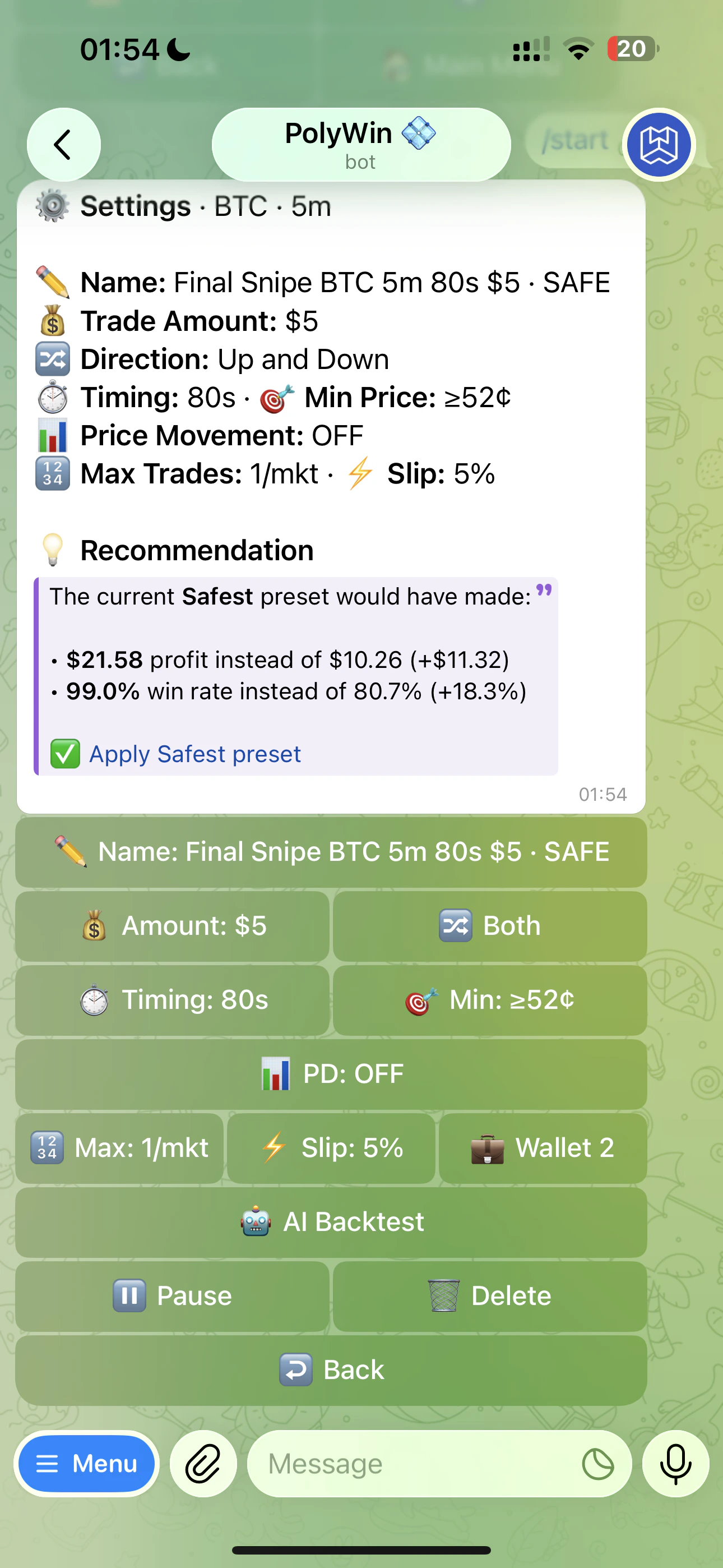 It appears when your current parameters don't match the latest canonical preset for your track (Most Profitable, Fast, or Safest). PolyWin shows:
* **PnL delta** — what the recommended preset would have earned vs your current setup, scaled to your trade amount
* **Win rate delta** — and how the win rate compares
* **✅ Apply preset** — a one-tap link that overwrites your params with the recommended ones
The nudge is informational. You can ignore it, run another backtest yourself, or apply it instantly.
The nudge only fires when the difference is meaningful. If your params already beat the canonical preset, you won't see one.
It appears when your current parameters don't match the latest canonical preset for your track (Most Profitable, Fast, or Safest). PolyWin shows:
* **PnL delta** — what the recommended preset would have earned vs your current setup, scaled to your trade amount
* **Win rate delta** — and how the win rate compares
* **✅ Apply preset** — a one-tap link that overwrites your params with the recommended ones
The nudge is informational. You can ignore it, run another backtest yourself, or apply it instantly.
The nudge only fires when the difference is meaningful. If your params already beat the canonical preset, you won't see one.