

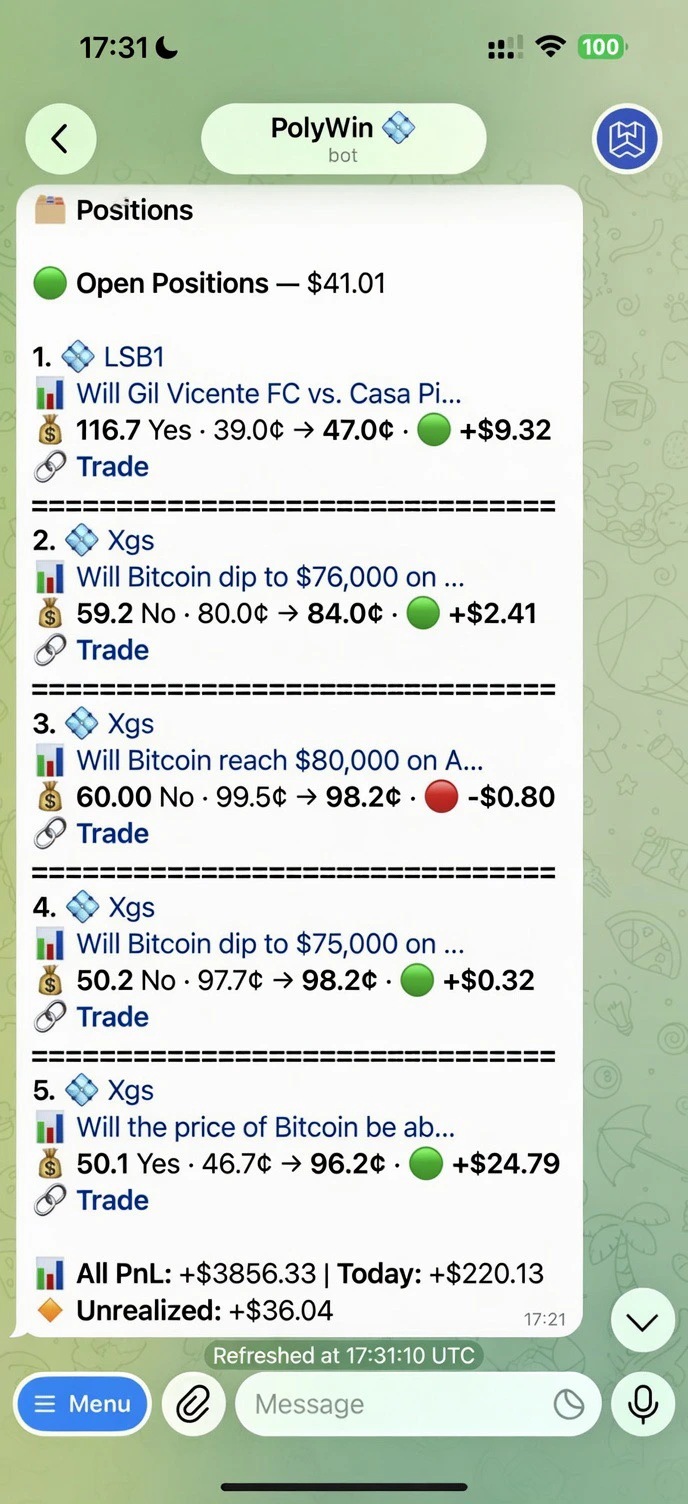
Open Positions — five live cards with per-position PnL plus aggregate footer
What you see
Each open position is one compact line with:- Rank + source —
1. 💠(Copy) /⚡(Snipe) /📊(Manual) and the leader/strategy name - Market title — truncated to fit one line
- Position line —
shares · YES/NO · entry¢ → current¢ · 🟢/🔴 ±$PnL - 🔗 Trade link — opens the trade terminal scoped to that market, where you can sell, add, or set a limit
- All PnL — total realized PnL across every closed position
- Today — realized PnL since midnight UTC
- Unrealized — sum of live PnL across the cards above
Tabs
- Open
- ⏳ Pending
- History
Live positions across all your wallets and strategies.
Filters
A source-filter row sits below the tabs: All · 💠 Copy · ⚡ Snipe · 👋 Manual. Tap any chip to scope the visible list to that origin only — useful when you’ve got positions from multiple Copy strategies and snipers running at once. You can also drill deeper:- Wallet — single wallet only
- Strategy / Leader / Sniper — open the strategy or leader card and tap Positions there
Sell All Positions
A 🔴 Sell All Positions (N) button lives at the bottom of the Open tab — one-tap mass exit when you need to flatten the book. The count reflects only positions matching the current filter, so you can mass-sell just the Copy or Snipe slice if you want.Actions per position
Manual sell
Sell any position with one tap.
Partial sell
Take some off the table — 25%, 50%, 75%, or custom.
PnL refreshes live. Open the hub anytime to see the latest.